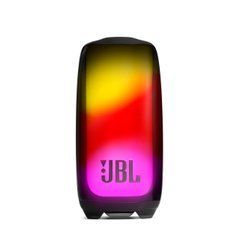
When a speaker with lighting makes sense
JBL PULSE combines music playback with an illuminated enclosure. It suits situations where the speaker contributes to the atmosphere of a room, an evening gathering or a small celebration. Decide how much the visual element matters before choosing. Background listening while working, a quiet evening and a lively gathering may call for different light settings and listening levels. Compare how easily the particular generation lets you manage those settings.
Assess the lighting under your usual room conditions, rather than only in a dark demonstration area. Effects that look appealing at a party may distract you beside a monitor or before sleep. Check available adjustments and how to change modes. Having decorative lighting does not establish that the speaker replaces a room lamp or integrates with a smart home lighting system.
Why the PULSE generation matters
The number in the model name identifies a particular set of specifications. Do not transfer a newer model’s features to an earlier one. For example, JBL specifies IPX7 protection for Pulse 4 and IP67 for Pulse 5. These are different ratings: the X does not establish a particular dust protection level. For travel and outdoor use, that distinction may be more relevant than the family resemblance.
Compare dimensions, weight, carrying arrangements, controls and charging accessories. If you already own another JBL speaker, include its exact model in the comparison. Compatibility is not determined solely by the brand or release year. Check the required application and supported functions for the selected model too. An older promotional application name is not always sufficient to identify the appropriate current setup instructions.
PartyBoost, speaker groups and stereo pairs
JBL lists PartyBoost for Pulse 4 and Pulse 5. However, shared playback and separation into left and right channels need individual checks. Do not assume that any two speakers with a similar linking button automatically form a stereo pair. For a particular combination, establish the supported mode, necessary settings and software requirements. This is especially important when you are buying a second speaker specifically for stereo listening.
Two playback locations can distribute music among listeners, but they do not eliminate the need for suitable placement. Test the group at a short distance first, then move the speakers to their intended positions. Listen from several locations and confirm that the connection remains stable. Check the lighting behaviour separately: synchronised audio and the desired visual effect are not automatically the same capability.
Battery use, lighting and charging
Plan around your actual listening routine rather than an advertised maximum duration. Volume, lighting settings and battery condition affect practical running time. Before an evening event, charge the speaker and test it using the settings you intend to keep. Allow a time margin, particularly where access to a power outlet is limited. A brief demonstration does not establish how long the setup will operate through an entire gathering.
Check the required power supply specifications and included accessories before ordering. A charging cable does not necessarily mean that a mains adapter is supplied. Do not assume the charging connector also accepts audio or provides power for a phone. Each of these functions needs confirmation in the model’s instructions. After moisture exposure, follow the manufacturer’s directions before connecting power; enclosure protection does not remove charging requirements.
Assessing sound and choosing a position
Listen to familiar recordings with vocals, percussion and bass at a moderate level. Pay attention to clarity, balance and comfort over a longer session. An impressive light effect can distract from the sound, so spend some time evaluating the recording on its own merits. Include spoken material if you listen to podcasts. For video, test picture and sound alignment using your own playback source.
Use a stable surface and leave space around the enclosure. A room corner, shelf and open table can produce different impressions of bass. Avoid correcting an unsuitable position simply by increasing volume. If nearby objects rattle, remove them before judging the speaker. At a table gathering, check that belongings do not block the enclosure and that everyone can see the lighting. Route the power cable so that it cannot be pulled by somebody walking past.
Choosing a complete setup for home, travel or a gift
At home, accessible controls and convenient charging are priorities. For travel, consider protection during transport, the weight of accessories and access to power. For a gift, establish whether the recipient owns other speakers and expects them to work together. Choose the enclosure colour after these practical questions have been addressed. Also consider storage space if the speaker will regularly be packed away between uses.
Before ordering, verify the complete model name, included equipment, phone compatibility and required linking mode. If the main task is karaoke or connecting a musical instrument, check the corresponding inputs separately; light effects do not establish their presence. Explain the intended use when requesting assistance so that the choice reflects both your listening expectations and your daily routine. A useful comparison covers the whole setup, rather than just its appearance during a short demonstration.
SoundsGood supplies sound equipment for educational institutions, studios, concert halls, conference rooms, and public and private organisations. A technical brief can be used to agree on system components, specifications, a commercial quotation, documentation and delivery arrangements.