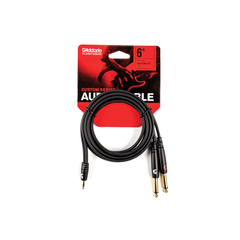
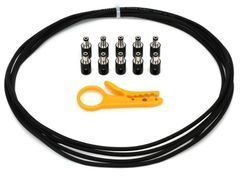
Choose for the actual connection
Start by describing the job: guitar to pedalboard, microphone to mixer, processor to interface, amplifier to passive speaker or computer to a digital device. This immediately narrows the search. Next, record the port labels on both devices and the required length. A request for a jack-to-jack cable leaves the diameter, contact count, wiring and electrical function unspecified. That is not enough for dependable selection, even if the plugs in a photograph look familiar.
This category includes several cable families, so compare products within the relevant group. Judge an instrument cable for its instrument connection and a digital cable against the requirements of its interface. A thicker jacket or higher price does not automatically give a better result in every application. Begin with the same purpose, comparable length and confirmed connector compatibility. You can then assess construction, handling and serviceability in a meaningful way. The purchase will be tied to a working system rather than a general impression of quality.
Finished assemblies or cable sold by length
A finished assembly is convenient when standard connectors and lengths suit the route: it arrives as a complete item with a defined part number. Cable sold by length is useful for installations, unusual distances or a larger set built to a specific plan. A cut length is not yet a working connection, however. It needs compatible connectors, proper termination, strain relief and testing. Include those services and materials in the overall budget if assembly is being arranged separately.
Confirm the sales unit, the length of the actual item and what is included. A reel photograph does not necessarily mean the entire reel is supplied, while a connector shown in a product-family description may not be included with every part number. For a custom assembly, specify both ends, total length, wiring and labels. Keep that specification for repeat orders, studio expansion or replacement rental stock. It helps prevent a later cable differing from the original in a small but significant detail.
Instrument cables and pedalboard connections
Separate the longer lead from the instrument from short connections between pedals. The first needs suitable freedom of movement, convenient handling and dependable cable entry at the plug. The second depends on space between pedals, cable direction and access to adjacent sockets. A low-profile housing may save room, but its shape must fit the actual input layout. Sketch the pedalboard from above and from the side before ordering a complete set, including power connections and protruding plug housings.
Do not add unnecessary length once the route is known, but avoid a lead that becomes tight during normal performance movement. Compare specifications for the instrument cable family rather than transferring claims from a microphone cable by the same brand. Tell the adviser about active instruments, buffers or wireless receivers in the route. Test the assembled board in every required mode, including bypass operation. One working effects path does not confirm that the entire switching arrangement is connected as intended.
Microphone and balanced line connections
Select a microphone cable by its stated application and connector wiring. For example, the manufacturer specifies Van Damme Classic XKE Microphone for analogue balanced microphone and line-level signals. That identifies a particular product family; it does not establish that every XLR cable is suitable for every possible connection.
For stage microphones, allow for stand adjustment and lifting the microphone without pulling the cable tight. In a permanent studio route, neat installation and connector access may be more important. Where phantom power is used, follow the equipment guidance and do not improvise wiring changes. Test each completed line with the actual source. Check normal handling noise, plug retention and interruptions during ordinary movement. In a large set of identical lengths, record the identification of each tested lead so the result refers to a specific item.
Speaker, insert and interconnect cables
Choose the cable between a power amplifier and passive loudspeaker separately from low-level signal wiring. Route length, load requirements, contact assignment and permitted connections matter. Do not replace it with an instrument lead simply because the plug fits. With active speakers, first identify the audio input being used: a request for a speaker cable may describe an entirely different signal and construction. Clear photographs of port labels at both ends are more useful than a general picture of the speaker.
An insert cable serves a corresponding send-and-return point. Before purchase, establish the contact functions and the external processor's sockets. Select interconnects by channel count and input and output types. Identify stereo pairs clearly so left and right do not change after servicing. In a tightly packed rack, account for plug-body depth and space behind the equipment. A connection that is electrically correct can still be inconvenient if there is no room to release, bend or remove it without disturbing neighbouring devices.
Digital, MIDI and optical cable selection
For digital connections, identify the precise interface before choosing the connector shape. AES, BNC, Ethernet, optical and MIDI cable categories cover different functions. A housing name does not establish identical data transmission. Compare source and destination documentation, direction and permitted length. For older equipment, record the full model and generation: similar product names can conceal different ports or protocols. Searching only by cable appearance is particularly unreliable in this situation.
An optical connection requires appropriate ports and compatible formats at both ends. Observe bending guidance during installation and protect connector ends from contamination. Choose MIDI wiring for the implementation on the actual devices, checking any adapter's pin assignment. For networked audio, follow the system's cable requirements. A plug fitting into a socket does not confirm compatibility. Acceptance testing should demonstrate stable operation in the intended mode, rather than merely a link indicator or a device appearing in a connection list.
USB, HDMI and FireWire in an audio setup
A USB cable for an audio interface must suit both the interface and computer requirements. USB-IF notes that cables have different capabilities; a USB-C shape does not describe them all. Check data operation, power and length separately. A cable cannot add functions that the connected devices do not support.
For HDMI, consider the operating mode of the complete AV system, including the display and intermediate devices. The official HDMI cable guide distinguishes cable types and explains the relevant identification. For FireWire or other existing older interfaces, confirm the actual ports before ordering. Do not assume an arbitrary adapter between standards will work. Establish a supported connection method first, then select the cable and any necessary active components. This is particularly useful when replacing a computer while retaining an older interface.
Preassembled multicores and reeled cables
A preassembled multicore is useful when several channels follow one route. Compare line count, terminations, breakout length and readable numbering. An operator should be able to identify the tail corresponding to a stage channel without untangling the whole assembly. Decide where it will be stored and how it will be coiled before purchase. Convenient setup depends on handling a physically long assembly as well as its electrical properties, especially when it moves regularly between venues.
A reel helps transport and deploy the appropriate cable, but does not change interface requirements. Check access to both ends, drum construction, operating conditions and service options. Test data cables at their full actual length with the intended equipment. A short sample working correctly does not establish that the complete route will do so. Provide connector protection in transit and a clear function label for a mobile kit. When several operators use the same equipment, brief deployment instructions are more useful than an unexplained colour code.
Cable construction and connector compatibility
Look at conductor count, screening, overall diameter, jacket and termination method. These details are useful in the context of an application, rather than as an independent quality ranking. For connectors fitted during assembly, confirm the permitted cable diameter and conductor requirements. A housing that cannot grip the jacket correctly will not provide suitable strain relief simply because the electrical joint is tidy. On a finished assembly, inspect the entry and check that ordinary equipment placement does not force a sharp bend beside the plug.
Frequently connected leads benefit from accessible latches and practical servicing. A permanent installation may place greater emphasis on compactness, routing order and a documented specification. Do not transfer priorities from one application to another automatically. When comparing offers, write down the same set of parameters for each. If information is missing, ask for it instead of inferring it from a photograph. A family name is not a substitute for the actual part number's details, especially where the range includes different diameters, lengths or terminations.
Measure the route and organise storage
Measure along the actual path: beside walls, around walkways, up to the stand and into the required connector. Add working allowance where equipment moves or slides out for servicing. Excess length creates loops, while a short lead puts tension on the port. A few standard lengths labelled at both ends are convenient, with unusual assemblies stored separately. This speeds selection and reduces the time needed to check completeness after an event. It also helps explain a replacement requirement without inspecting the entire kit.
Avoid forcing twists into the cable while coiling, and follow the manufacturer's bend guidance. Use suitable reusable wraps without excessive compression. Deal with wet or dirty items according to the manufacturer's care guidance before storing them for long periods in a closed bag with dry cables. Protect connectors against transport impacts. Inspect jackets and entries regularly, separating questionable items until tested. A defined place for faulty leads prevents their accidental return to the working set during a hurried setup or pack-down.
Acceptance checks and real operating tests
On delivery, compare the part number, length and both terminations with the specification. Check each cable in a larger set rather than only the first example. A tester checks connections within its capabilities, but final testing should include the actual devices. Run digital lines in the required transmission mode and analogue lines through all channels at normal operating levels. Keep the results and identify items ready for use, so issuing the kit later does not require sorting the whole delivery again.
When investigating a fault, replace one element at a time and note what changes. Comparing with a known working cable of the same function helps distinguish wiring issues from equipment settings. Do not place an uncertain lead into general spare stock. Retest after repairs or connector replacement. For a mobile system, keep tested spares of critical types and lengths so a replacement does not require redesigning the route. Update the label and inventory entry if an item's length or purpose changes during servicing.
Questions before buying
Will an expensive cable improve every system? Correct purpose, compatibility and serviceable condition come first. Then compare documented specifications and convenience for the application, rather than promises of a universal improvement in sound.
Can all leads be ordered in one length? That simplifies inventory but may complicate setup. Measure short studio routes and distant stage positions separately, then choose a few practical length groups.
What information helps with selection? Give the source and destination models, port labels, required function, length and operating conditions. For a complete kit, add channel count and a list of cables already available.
SoundsGood supplies sound equipment for educational institutions, studios, concert halls, conference rooms, and public and private organisations. A technical brief can be used to agree on system components, specifications, a commercial quotation, documentation and delivery arrangements.