Choose accessories for the complete configuration
A wireless accessory usually solves a specific problem: mounting a receiver in a rack, placing an antenna outside a case, charging transmitters between events or replacing a damaged cable. Start with that task and the complete identification of the main equipment. A family name without generation, frequency range or suffix may be insufficient. For a package containing several devices, list all components instead of choosing each accessory in isolation.
Separate mechanical, electrical and functional compatibility. A mounting part must fit the housing, a cable must suit its connectors and signal, and a charger must support the battery and charging method. A unit that physically fits a slot does not necessarily support the required function. Confirm the accessory part number, especially when replacing an older item or combining equipment generations. Retain this information for maintenance so a future replacement can be selected from a known working specification.
Rack hardware and connector access
Evaluate a rack kit by compatibility with the particular receiver, the number of chassis to be mounted and the included hardware. A half-width unit may require a joining piece, blank panel or different kit depending on whether one or two devices are installed. Standard rack width does not guarantee that holes on the equipment itself align. Follow the manufacturer's arrangement and confirm the required screws rather than substituting arbitrarily longer ones.
Plan more than front-panel space. Consider case depth with cables attached, access to power and whether lids close without pressing on connectors. Moving antennas to the front panel requires suitable extension cables and fittings, not merely rack ears. Cable loops should permit servicing without becoming trapped under a lid. For a portable system, check the complete assembled case before its first event and label easily confused components. Allow enough access to replace a power supply or cable without dismantling unrelated parts of the rack.
Antennas and distribution components
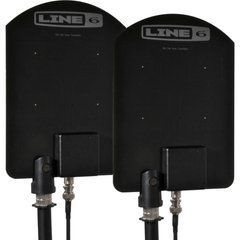
Select antennas by frequency range, intended role and coverage area. A directional model needs appropriate orientation, while an active model needs the specified power arrangement. Gain cannot substitute for effective placement: a closed metal rack or unsuitable cable route may require installation changes. Establish whether remote placement is needed, how much coaxial cable is involved and the cable loss at the operating frequencies. Connector type alone does not describe the complete RF path.
A distribution unit for several receivers is selected around bandwidth, outputs, A/B routing and power support for connected components. It is not a transmitting combiner for arbitrary transmitter outputs. AKG describes APS4 as an antenna distribution product with a defined set of mounting and cable parts; the exact sales package must still be checked. For rack expansion, review permitted cascading and the complete structure rather than counting spare ports alone. Record which antenna and cable feed each path so future changes remain understandable.
Charging stations, batteries and package contents
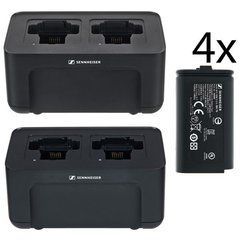
A charging package must support your exact batteries or transmitters containing the appropriate rechargeable packs. Sennheiser CHG 70N-C, for example, has two charging bays and supports specified EW-DX transmitters and BA 70 batteries. It is not a universal charger for every Sennheiser wireless system. Check separately whether batteries are included, whether a power supply is supplied and which package version the listing describes. Similar product names can refer to different combinations of accessories.
Network management, PoE power and charger cascading are distinct capabilities with their own conditions. Sennheiser documents CHG 70N-C operation from a specified supply or suitable PoE; cascading rules must not be transferred between those arrangements without checking. Plan charging capacity around the number of ready transmitters needed at the same time. Where batteries are charged separately, identify their status and assignment so discharged spares cannot become mixed into the working set. A clear return-and-charge routine is particularly useful in shared equipment rooms.
Cables, adapters and routine care
A connecting cable may carry audio, RF, power or data, and those purposes are not interchangeable. Lavalier connections depend on wiring and power, instrument connections on the supported input, and antenna cables on impedance and loss. Do not judge suitability solely because a plug enters a socket. When replacing a locking cable, also check the locking mechanism and cable tension after attaching the transmitter to clothing. Confirm that normal movement cannot pull the connector sideways or repeatedly bend the same small section.
After each event, inspect connector housings, mounting hardware and cable entry points. Maintain charging contacts according to the manufacturer's instructions rather than using arbitrary liquids or abrasives. During transport, separate sharp mounting parts from delicate microphone cables. A small labelled stock of compatible cables and hardware is more useful than a collection of unrelated adapters. A tested spare should fit the specific system and allow replacement without redesigning the connection under time pressure. Store identification with the spare rather than relying on memory.
Questions about selection and installation checks
Is a photograph enough for identification? It helps, but complete markings are also needed to distinguish versions that look almost identical. Does a bundle contain everything required? Check mounting pieces, cables, batteries and power supply separately. A bundle name describes a particular contents list, not automatic readiness for every application. Compare the supplied parts with your own installation drawing before ordering.
What should be checked after installation? Confirm secure mounting, access to controls, strain-free connections, correct power and real audio on every channel. After antenna changes, test coverage across the operating area. After purchasing a charging package, complete a trial charging cycle following its instructions. What information helps with selection? Provide every device model, required channel count, case dimensions, cable lengths and intended operating routine. This makes accessory selection part of system planning rather than a search for a similarly named part. Keep the final parts list with the equipment for future servicing.
SoundsGood supplies sound equipment for educational institutions, studios, concert halls, conference rooms, and public and private organisations. A technical brief can be used to agree on system components, specifications, a commercial quotation, documentation and delivery arrangements.