
|
Quantity
|
Cost
|
||
|
|
|||
|
|
|||
Charging, data or music equipment?
USB and Lightning are used for power, charging, synchronisation and compatible peripherals. A musician may need an interface-to-computer link, a MIDI keyboard connected to a tablet or a particular iRig connected to a mobile device. Define that function first. A cable that charges a phone should not automatically be considered a universal audio connection. Apparently suitable ends do not establish the complete operating scenario.
Record both device models, their ports and the intended route. Establish whether data and mobile-device charging are needed simultaneously. Recording also depends on operating-system, application and interface compatibility. The cable is one part of the system and cannot add unsupported hardware or software functions. A clear description avoids purchasing adapters merely in the hope that a matching shape will provide the desired result.
USB-A, USB-B, USB-C and dedicated ends
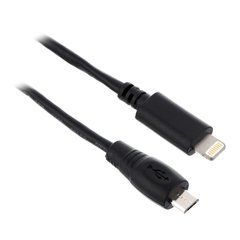
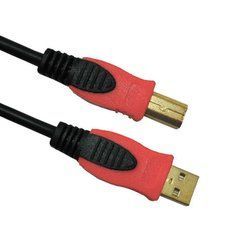
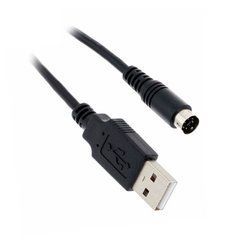
Connector names describe the physical connection without defining every capability. USB-A and USB-B appear on computers and music peripherals, while USB-C can support different data and power arrangements. Micro-USB and Mini-DIN are different connections. Do not choose a replacement from the word mini or an approximate plug size. A complete designation and clear port identification provide a better basis.
Check both ends, housing shape and clearance around the sockets. A dedicated equipment connector needs a cable with confirmed compatibility. A mechanically suitable adapter may not provide the necessary function. An older USB-B interface and a USB-C computer may use a suitable data cable, but the interface manufacturer determines its requirements. Retain the exact model so recommendations apply to the correct hardware generation.
USB-C shape does not specify data speed
USB-C does not automatically mean USB4, high data speed or video support. USB-IF distinguishes these terms: capabilities depend on implementation in the cable and devices. Read the stated functions rather than selecting only by the oval plug. Every component, including the computer port and any intermediate equipment, must support the intended operating mode.
For USB audio, follow the requirements of the specific interface. A higher cable speed rating does not change the device's protocol or independently guarantee better sound. Reliable communication, appropriate data capability and power are what matter. If the same lead will serve storage devices, assess that task separately. Successful audio operation does not demonstrate maximum file-transfer speed or additional functions required by another piece of equipment.
Check charging capability separately
Data performance and power delivery are separate properties. The charger, cable and receiving device must agree on the required charging arrangement. A large power figure on one component does not mean every phone receives that amount. Examine the model documentation and supported protocol, especially when a lead is intended for both a laptop and music equipment. Different tasks can impose different requirements on the same connector type.
USB-IF cable information treats power and data capability markings separately. Do not attribute certification to a particular listing without evidence. Exact version, functions and length matter. For bus-powered equipment, also check the power available at the actual port or hub. A cable's nominal rating is not a substitute for verifying how the complete assembled system supplies its peripherals.
Lightning sync cables and accessory connections
Connecting Lightning to a computer or charger differs from using an iPhone or iPad with external audio equipment. Apple describes USB-C to Lightning for charging and synchronisation. That description should not be extended to arbitrary peripheral connections. A specific accessory may require a different cable or adapter even when a normal charging lead appears to have suitable ends.
Apple also documents USB camera adapters for compatible USB devices, including audio and MIDI equipment. This is a separate connection arrangement. Before ordering, check the mobile model, system version, interface support and power needs. Lightning at one end and a familiar USB connector at the other do not prove the entire scenario, particularly when replacing a computer with a tablet.
Dedicated IK Multimedia cables
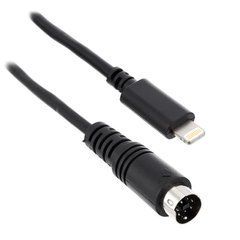
IK Multimedia cables with Mini-DIN and other terminations are intended for defined products. Exact compatibility lists matter. The Lightning to Mini-DIN cable has a specific role, and the manufacturer states that this version does not charge the mobile device. Do not transfer charging features from another similarly named version to it.
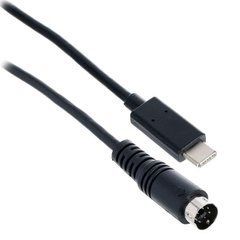
USB-C compatibility also differs among iRig models. Consult IK's compatibility information, not merely a family name. For example, the manufacturer describes a different connection route for iRig Stomp I/O. Start selection with the full equipment designation to avoid buying an outwardly similar accessory intended for another implementation. A matching brand is not sufficient evidence of interchangeability.
Interfaces, hubs and bus power
For initial testing, use the documented connection without unnecessary intermediate components. If a hub is required, check its compatibility, power and the audio manufacturer's guidance. Adding a keyboard, storage and other peripherals changes the configuration. One device working on a port does not validate any number of devices through a multiport adapter. Test the actual kit intended for recording or performance.
Focusrite provides USB cable selection guidance for its interfaces; another brand may specify different requirements. Do not label any USB lead a universal studio solution. Interface model, computer port and power arrangement provide more useful information than a general audio description. Retain the working configuration when adapters are involved so a verified combination is not lost.
Length, extension and mechanical fit
Measure the actual route with working access in mind. The cable should not pull a small interface off a desk or load a phone socket. Excess loops are inconvenient too. Do not extend a connection through an arbitrary chain of passive adapters without checking it. Distance and intermediate equipment must suit the particular USB application. A familiar connector does not establish one allowable length for every possible connection.
An angled plug may help, but check its exit direction and compatibility with a protective case. Braiding or a substantial housing does not guarantee protocol support; these relate to handling. Choose construction that fits without misalignment or unnecessary force. Avoid sharp bends near plugs in storage and do not compress the lead beneath heavy items in a transport case. Mechanical convenience should preserve the connection.
Checking data and the music application
After connection, confirm that the operating system recognises the device, then select the correct audio or MIDI port in the application. A power indicator alone does not prove data communication. Make a trial recording and playback with an interface, or verify incoming messages from a controller. Use the same route planned for real work. Power reaching the enclosure is not a complete test of a music setup.
If disconnections occur, compare operation with a known good suitable cable and reduce intermediate components. Do not change the driver, port, hub and every setting at once. Progressive testing identifies the cause rather than merely producing a temporary working state. Before an important session, test the complete kit in its intended application. Seeing a device name appear once in a system list is insufficient verification.
Organising studio and mobile kits
Identify dedicated IK and other proprietary assemblies so they are not mixed with ordinary charging leads. Keep product references and compatible models for repeat orders. Where several people share a case, labels should explain the purpose without verbal instructions. This is particularly helpful for short accessories that are easily confused by connector appearance despite differences in their actual functions.
Before travelling, test the whole set: mobile device, interface, cable, adapter and required power. Establish separately whether charging during use is necessary and whether the selected arrangement supports it. Prepare a tested spare for the essential connection. Inspect plugs after use and separate intermittent assemblies from working ones so a previously observed but unmarked problem does not recur during the next session.
Frequently asked questions
Are all USB-C cables equally fast? No. Check the stated capabilities of the cable and both connected devices.
Will a charging lead connect an audio interface? Data support and the appropriate peripheral connection scenario must be confirmed.
Does an IK Mini-DIN cable fit every iRig? Compatibility depends on the exact equipment and cable models.
What information helps with selection? Provide complete model names, ports, length, data requirements and whether simultaneous power or charging is needed.