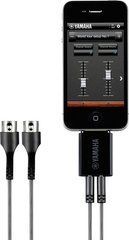
Plan MIDI control separately from the audio route
The Roland MIDI Basics guide explains that a conventional MIDI connection carries messages rather than the audio signal itself. A keyboard-to-module MIDI lead therefore does not replace the module's audio connection to a listening system. A control route normally goes from the source MIDI OUT to the destination MIDI IN.
Before ordering, make two short diagrams: command flow and sound flow. For a keyboard setup, identify the controller, sound module and audio output; for a pedalboard, identify the foot controller and the processors it controls. This makes MIDI cable counts clearer and avoids confusing them with audio patches. Describe return communication separately if it is needed. Several ports on two devices do not mean every socket must be connected. Each line should have a defined purpose in the working arrangement.
Check the implementation of DIN, TRS and USB
Five-pin DIN, compact TRS and USB appear in different MIDI systems, but cable choice depends on the actual ports. TRS wiring matters. The MIDI Association describes Type A and Type B arrangements, so identical mini-jack size does not establish adapter compatibility. Compare both devices' requirements.
Do not infer function from a resemblance to a headphone or expression socket. Read the label and the relevant manual section. If one device uses USB and the other DIN, establish the connection method and any required interface or host. An ordinary passive adapter is not a universal solution. Give the full model names when ordering, including older equipment generations where these affect connectivity. Retaining the completed diagram is useful when part of the system is upgraded later.
Compact housings and adjustable plug direction
In a crowded pedalboard or rack, a MIDI plug can obstruct neighbouring connectors or press against the rear of a case. The RockBoard FlaX Plug MIDI range offers adjustable orientation of a compact DIN housing and a flat cable. This helps organise the cable exit, although actual clearance still needs measuring.
Check direction at both devices rather than only the easier end. Leave room for disconnection and avoid pressure from the transport lid. Adjust the housing according to its instructions; the device port should not act as a support while the angle is changed. Once routed, confirm that the cable does not cover power, audio sockets or switches. A photograph of the correct layout is useful for regular reassembly. It helps recreate a compact arrangement without unnecessary force on plugs or equipment panels.
Length and control of multiple devices
Measure the real path from controller to receiver, accounting for stands, stage edges and normal movement. Inside a board, allow modest working slack instead of stretching short leads. For a larger setup, establish how commands reach every device first. Do not assume any OUT behaves automatically as THRU: forwarding functions depend on the equipment and settings. Confirm this before deciding cable quantities and the connection sequence.
For example, the BOSS GX-100 settings provide separate parameters for MIDI transmission and clock. Retain a port and direction map for your own system. Use appropriate equipment when messages need distribution or merging. Unnecessary return connections with no defined purpose complicate investigation of repeated commands or unexpected behaviour. Mark which lines are essential during performance and which are used only for editing or configuration.
Test before rehearsal and performance
Start with two devices and one tested cable. Select the MIDI channels and confirm that the required message transmission and reception are enabled. For a keyboard, test notes being played and released; for a foot controller, test the required program or parameter changes. One successful signal does not confirm every function. Test the actions needed for the current performance or recording workflow before expanding the arrangement.
If there is no response, check IN/OUT direction, channel and adapter documentation, then substitute a known compatible spare lead. Avoid changing all settings together. For tempo synchronisation, define the clock source and receivers separately. Repeat the test after each device is added. Save the working configuration and label cable ends with port names. This preparation makes setup after transport easier and helps distinguish a cable issue from an accidentally changed setting. Include a short diagram when handing the kit to another performer.
Frequently asked MIDI cable questions
Is MIDI enough to hear a synthesiser? An appropriate audio route or another supported way of listening to the sound device is also needed. Control and sound transmission are separate parts of the setup and should be checked independently.
Are all DIN–TRS adapters identical? No. Confirm diameter, Type A/Type B or the manufacturer's specified wiring. Similar housings do not establish pin assignment. The original accessory's part number helps when selecting a replacement.
Can the controller be powered through the lead? Do not assume this without explicit support from both devices and the appropriate wiring. A cable's advertised capabilities alone do not confirm compatible power delivery throughout the system.
What helps with selection? Provide controller and receiver models, ports, required commands, distances and photographs of tight installation areas. For a complex rig, include a control diagram with audio connections identified separately.
SoundsGood supplies sound equipment for educational institutions, studios, concert halls, conference rooms, and public and private organisations. A technical brief can be used to agree on system components, specifications, a commercial quotation, documentation and delivery arrangements.