Choosing a JBL PartyBox for the event you actually host
Start with the setting: a house party, terrace playlist, karaoke evening and travelling event need different combinations of sound output and mobility. Decide where the speaker will stand, how close listeners will be and whether reliable mains power is available. A large enclosure may suit dancing but become inconvenient in a small room or on a staircase. For home use, listen at moderate levels too. The system should work for ordinary evenings rather than only the loudest occasion you can imagine.
Do not choose exclusively by watts. Compare dimensions, weight, available inputs, carrying arrangements and battery operation for the exact version. Outdoor listening differs from a room, and guest conversation affects intelligibility. A universal promise that one speaker serves a certain number of people is therefore incomplete without information about the space, listening distance and intended programme.
Battery operation and the power plan
The PartyBox name does not mean every model uses the same power arrangement. Before ordering, confirm whether your chosen version has a battery, how it charges and whether your intended combination of playback and charging is supported. Advertised runtime describes specified test conditions. Volume, lighting and programme material affect actual endurance, so allow a reserve and rehearse with your own music before an event.
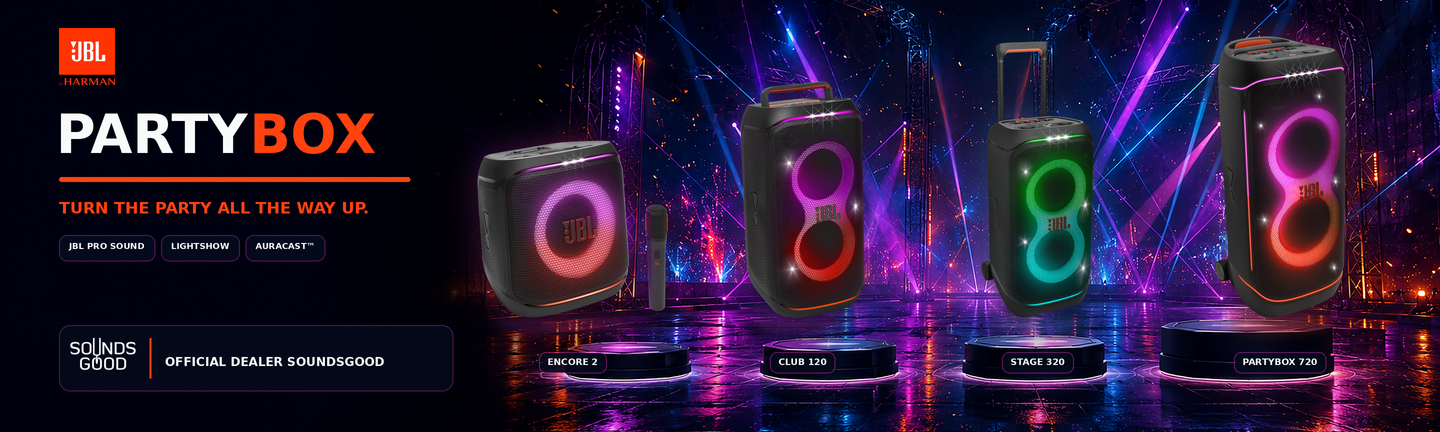
JBL provides replaceable batteries for the Club 120 and Stage 320; check the additional battery and its compatibility separately. This does not establish interchangeability across the entire PartyBox range. When using a wall outlet, plan the cable route so it cannot become taut when the speaker moves or cross a walkway without protection. Mains connections and exposure to moisture require consideration independently of the enclosure's protection rating.
Karaoke, microphones and instrument connections
For karaoke, count how many people will sing simultaneously and compare that requirement with the selected speaker's inputs and controls. Bluetooth music reception does not automatically provide compatibility with every wireless microphone. A radio microphone may require its own receiver and a suitable output connection. Read the package contents carefully: an illustration showing a microphone does not establish that it is included.
If you plan to connect a guitar, check the input's purpose and accepted signal level. Identically shaped sockets need not perform identical functions. Begin with low levels, test each source separately and balance the vocal against the backing track. Keep the microphone behind the speaker's main forward coverage and avoid pointing it towards the drivers. Address feedback by changing placement and reducing the relevant level, rather than turning the music up to cover the whistle.
Stereo pairs and multiple PartyBox speakers
When adding a second speaker, check both complete model names and the supported linking system. The Club 120 and Stage 320, for example, support Auracast; that capability should not be assumed for earlier generations. Also distinguish a left/right stereo pair from multiple speakers reproducing the same programme. These are different requirements, and the permitted model combinations may differ.
Physical placement matters as well. Two enclosures standing almost together will not provide a useful wide stereo listening area, while excessive separation may make the balance inconsistent for guests. For a presenter, instrument or DJ setup, test the complete signal path for delay before the event. Do not assume that any wireless grouping arrangement is suitable for monitoring a live performance. Rehearse with the actual sources and connections that will be used on site.
Transport, stable placement and lighting
Measure the vehicle space, doorway and storage position before ordering. Wheels help on a suitable level surface but do not replace a workable plan for stairs. The Stage 320 includes wheels; check the handles and transport arrangements of the specific PartyBox you are considering. Secure the enclosure during travel and protect its connectors from pressure caused by other equipment.
At the venue, position the speaker securely, leave the controls accessible and keep fabric or decorations away from working surfaces. Treat lighting as part of the atmosphere: it can suit dancing but distract during speech or quiet background listening. Check the available modes and how to switch them off. Splash resistance is not permission to leave the system in rain or connect wet cables.
Checks before the first event
Build a short rehearsal checklist covering the main music source, speech, every required input, speaker linking and a backup playback method. Make the intended tracks available for your chosen setup, check the phone's battery and review notification settings. Listen from the guests' position instead of judging only beside the controls. If bass dominates, first consider placement and tonal settings before increasing overall level. This preparation makes it easier to select a PartyBox for practical use and avoids a last-minute search for adapters. Finally, confirm access to the outlet and a straightforward way to shut everything down after the programme.
Battery or mains operation
The PartyBox name does not guarantee a built-in battery in every model. For an event away from mains power, confirm the exact speaker’s power mode, runtime and charging options. A large enclosure with wheels does not automatically provide battery operation.
Microphones, instruments and a second speaker
For karaoke and performances, check input types, controls and whether a microphone is included. Essential and other variants may have different accessory bundles. Linking PartyBox units or connecting with a portable JBL speaker depends on the exact models and supported protocol.
Power and playback time
Stated playback time is a guide based on manufacturer test conditions. Volume, EQ, lighting and charging other devices can affect the result. Confirm the charger and cables; the same connector shape does not guarantee every charging or audio mode.
Connections and compatibility
Connecting a phone to a speaker and linking several speakers are different functions. Check exact model names, grouping technology and software requirements when adding another unit. Stereo pairing, app support, Wi-Fi, AUX and USB audio require separate checks.
Use and care
Place the speaker securely and keep its drivers unobstructed. Water and dust protection applies under the manufacturer’s stated conditions. Let ports dry before charging, and do not apply one model’s protection rating to another member of the range.
Buy sound equipment at SoundsGood
We can help match sources, channels, speakers, connections and budget. Provide a list of existing devices and describe where the system will operate. Confirm the warranty period and included accessories for each product.
Free delivery applies to online-paid orders from UAH 4,000. Promotional items, promo codes, special-order items and instalment payments are excluded. See the payment and delivery page for full conditions.
SoundsGood supplies sound equipment for educational institutions, studios, concert halls, conference rooms, and public and private organisations. A technical brief can be used to agree on system components, specifications, a commercial quotation, documentation and delivery arrangements.