Start with the meeting format and seating plan
Choose a conference microphone for the conversation it must support: an individual online call, several people around a table, a presentation with questions or a hybrid meeting. Each format has different coverage and control requirements. Mark regular seats, the meeting leader, the display and additional chairs on a simple plan. Include people sitting to the side or turning towards a presentation. Clear speech from one demonstrator does not establish that everyone will remain equally intelligible throughout a real meeting. Test normal conversation, quiet comments and questions from the furthest occupied seat.
For an individual desk, aim for a stable microphone position that leaves the display and documents accessible. At a shared table, test the end seats and each person's normal speaking level. If participants must repeatedly lean towards one microphone, the arrangement is already restricting natural conversation. Larger rooms may require several pickup positions and a defined way to combine them. Participant count alone cannot identify the right model. Distances, seating, room acoustics and expected movement all matter. Describe these conditions first, then compare equipment against the actual requirements.
USB microphones, speakerphones and delegate units
These devices can all be used in meetings, but their functions differ. A USB microphone sends speech to a computer; an integrated loudspeaker, speaking-queue management and synchronisation with application controls must be checked separately. A speakerphone generally combines capture and playback, while a delegate unit may belong to a dedicated conference system. The category name does not establish that every product provides all these features. List the functions you require and verify the exact product documentation before equipping the room. This avoids expecting one microphone to perform the tasks of a complete meeting system.
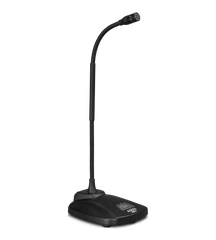
AUDIX USB12 appears in this catalogue. Its official specification lists USB connectivity, a 3.5 mm headphone or monitoring output and a bass roll-off filter. A headphone output should not be mistaken for a built-in loudspeaker. If everyone at the table must hear remote participants, plan room playback separately. Check the required cable and available computer ports, particularly when a camera and display will also be connected. Confirm the supplied accessories against the actual product listing. Functions provided by other equipment in a meeting room should not automatically be attributed to the microphone.
Echo, background noise and loudspeaker playback
During a hybrid conversation, a remote participant may hear their own voice when room loudspeaker audio is captured by the microphone and returned into the call. Acoustic echo cancellation, or AEC, addresses this type of echo. Establish where it operates in your configuration: the application, a separate processor or integrated room equipment. Do not assume that a microphone includes it because it is described as a conference model. A complex installation requires coordinated send and playback routing. A call with a real remote listener reveals the outcome more clearly than a local input meter.
Listen separately for ventilation, typing, table contact and paper handling. These have different causes, so one switch cannot resolve every disturbance. Keep the microphone away from laptop fans, use a stable support and avoid covering it with documents. Test with normal room equipment running rather than only in an empty, quiet space. If distance and reflections are making speech unclear, reconsider microphone and participant placement first. Raising gain alone does not improve the relationship between useful speech and ambient sound. Practical placement remains part of the system even when processing is available.
Computer setup and an understandable mute state
After connecting the microphone, check the input device in both the operating system and meeting application. A camera, display or headset can introduce another available microphone, so a physical connection does not prove that the intended device is selected. Record a short sentence or make a test call while speaking from the normal working position. Check playback selection as well: the remote voice should not unexpectedly go to unused headphones or a display without usable speakers. Note the exact names of the working audio devices so that settings can be restored after other peripherals are connected.
The microphone's physical button and the application's mute control may operate at different points in the signal chain. Do not assume their indicators synchronise without confirmed support. Establish how the user checks mute status and what the remote participant actually hears. If several button modes are available, choose the appropriate one using the instructions and explain it to users. A shared room benefits from a short operating guide containing the audio device names, call startup sequence and basic steps to follow when sound disappears. Clear controls matter when people with different levels of experience share the equipment.
Acceptance checks for a desk or meeting room
Test with someone outside the room and ask them to assess specific seats and situations. Each participant should speak normally, turn towards the display, ask questions and pause briefly. Listen for sentence beginnings, quiet endings and simultaneous conversation with the remote side. Use the usual arrangement of laptops and documents. A room that works well with an empty table may behave differently once people and their belongings are present. Test the meeting workflow rather than only speaking a few loud words directly into the microphone during initial setup.
Record the working settings and test starting another meeting after disconnecting and reconnecting the laptop. For a portable package, maintain a cable and adapter checklist. For a fixed installation, label connections so that users do not rearrange them at random. If recording is part of the workflow, evaluate the recording in accordance with organisational rules. Repeat coverage checks after changes to the table, display, loudspeakers or seating. Acceptance should establish everyday usability and repeatable startup. A successful first connection is the beginning of this process rather than proof that every meeting scenario has been covered.
Questions to resolve before ordering
Will one microphone cover the whole table? Test the furthest seats, working distances and speech clarity. Does a USB model require a mixer? A direct computer connection may not need one, but multiple sources require an agreed signal path. Does a microphone guarantee echo-free calls? No; the complete system determines that result. Can several USB microphones be used together? Check how the operating system and application support their combined use. Having enough physical ports does not by itself establish a convenient way to use every input in one call.
For selection assistance, provide room and table dimensions, regular and guest participant numbers, the computer model and planned playback equipment. Specify the meeting application, portability requirements and any local sound reinforcement. This helps establish a compatible solution and necessary accessories without unnecessary components. When different people use the room, prioritise understandable controls and repeatable startup. A well-chosen conference microphone should support the conversation. Confirm the final choice in your own configuration, with real seating distances and normal speaking levels, rather than relying only on product names or appearance.
SoundsGood supplies sound equipment for educational institutions, studios, concert halls, conference rooms, and public and private organisations. A technical brief can be used to agree on system components, specifications, a commercial quotation, documentation and delivery arrangements.