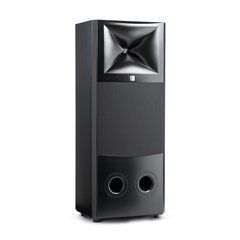
Choosing JBL M2 for a defined monitoring task
A passive studio monitor is part of a recording reference system, rather than simply a cabinet chosen by size. An engineer needs to judge the relationship between vocals and instruments, drum transients, reverberation tails and changes introduced by processing. Before ordering M2, describe the listening distance, number of listeners, room dimensions and material being produced. A dedicated control room and a home workstation beside a desk require different planning, even when both use the same audio interface.
Define the system's role as well: primary mixing reference, evaluation of finished masters or sound production for picture. Output headroom is useful for reproducing brief peaks without overload, rather than for continuous listening at maximum volume. If decisions must remain clear at quiet working levels, include that requirement in the demonstration. A successful installation helps engineers repeat their assessments under consistent conditions from one session to the next.
External amplification and DSP belong in the specification
The category name indicates that amplification is not built into the loudspeaker cabinet. However, JBL M2 should not be treated as a conventional domestic passive speaker with an interchangeable amplifier arrangement. JBL specifies external processing and an appropriate amplification configuration. Its setup documentation describes loading a dedicated DSP file to establish the required crossover in a compatible system. An unrelated loudspeaker preset is not an equivalent substitute.
Before purchase, agree on the exact amplifier and processor models, channels required for each monitor, connections to the driver sections and necessary software. Establish who will load and check the configuration after installation. The presence of DSP in an amplifier does not by itself demonstrate compatibility with the required settings. Keep the agreed wiring diagram alongside the configuration files so that the signal path can be restored accurately after servicing.
Planning the control room and listening position
Start with a room plan showing the desk, displays, doors, listening seat and possible loudspeaker positions. The left and right sides should operate under closely matched acoustic conditions. A large cabinet next to one speaker, or a nearby side wall on only one side, can affect the perceived stereo image. Symmetry therefore concerns nearby reflecting surfaces as well as the physical distance between each speaker and the listener.
Check installation height, cabinet orientation and whether displays obstruct the direct path from the drivers. Supports must suit the weight and footprint, remain stable and avoid unsafe overhang. There is no universally correct wall distance for every room: use the manufacturer's guidance for an initial arrangement, then evaluate the result through measurement and listening. Leave enough flexibility around furniture to adjust positions during commissioning instead of making the first layout permanent.
Signal routing and practical volume control
Draw the complete route through the source, audio interface or monitor controller, required processing, amplification and loudspeakers. An interface line output cannot replace a power amplifier output. Interconnections between electronic devices and speaker cables perform different jobs, so choose their connectors, construction and lengths accordingly. Before powering the system, check the label for every frequency section and channel against the approved wiring diagram.
A predictable master volume control with accessible attenuation or mute makes daily use easier. Match the operating levels throughout the chain so that the useful control range is not confined to a tiny movement of the knob. Check background noise with the actual production computer connected, rather than only with the source disconnected. Plan amplifier rack placement around ventilation, service access and the equipment's acoustic noise, which can become distracting during quiet editing work.
Measurement, room correction and bass assessment
Processing required for the loudspeaker itself and correction for a particular room serve different purposes. Changing the system crossover to address a room resonance can undermine the intended configuration. First confirm the preset, polarity, levels and physical placement, then evaluate the response around the listening position. Measurements help separate connection problems from the influence of walls, floors and furniture.
A deep bass cancellation cannot always be repaired by adding equaliser boost; its cause may be interfering sound paths at that particular seat. Consider moving the monitors or listener and improving acoustic treatment before applying electronic correction. Add a subwoofer to meet a defined requirement, coordinating routing, frequency division and time alignment. In a multichannel installation, specify bass management and the LFE channel separately because they perform different functions. Keep the monitoring configuration consistent with the intended production workflow.
Budgeting and accepting the complete installation
Compare the cost of a functioning monitoring chain rather than the price of one loudspeaker alone. The quotation should state speaker quantities, electronics, cabling, supports, installation, configuration and any required measurements. Confirm the sale unit and what the particular package includes. This avoids receiving the cabinets only to discover that the first session still requires additional amplification channels or essential processing hardware.
At handover, check each channel at low level and play familiar mono material to assess the stability of the central image. Then evaluate stereo recordings, short transients and bass consistency at the working seat. Record equipment positions, preset versions and the reference listening level. These notes are especially useful when several engineers share the room or when the installation must be restored after relocation. Include a practical explanation of everyday controls so users can adjust listening volume without disturbing system calibration.
SoundsGood supplies sound equipment for educational institutions, studios, concert halls, conference rooms, and public and private organisations. A technical brief can be used to agree on system components, specifications, a commercial quotation, documentation and delivery arrangements.