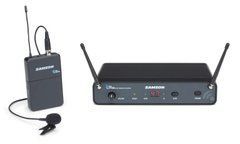
When a lavalier system is the practical choice
A wireless lavalier leaves the hands free for showing objects, working at a board or conducting an interview without a handheld microphone in the picture. It suits situations where a small capsule can be secured to clothing. Before choosing, picture the complete activity: sitting, walking, turning towards a screen, removing a jacket, leaning over a desk or moving between rooms. Those actions affect mounting comfort and sound consistency.
A lavalier does not remain at a fixed distance from the mouth through every head turn. If a presenter moves constantly and needs particularly consistent voice delivery, compare a headworn microphone. A lavalier is often practical for an on-camera interview, but concealed mounting requires more preparation. Choose it for the visual requirements and the person's behaviour rather than simply because the microphone is small.
Capsule pattern and clothing position
Lavalier microphones have different pickup patterns. Sennheiser, for example, identifies ME 2 as omnidirectional and ME 4 as cardioid. This distinction matters for orientation and evaluating speech during turns, but it does not establish one universally better choice. Compare the result in the required mounting position, with the actual voice and room acoustics. A small capsule does not automatically remove room noise.
Begin with the manufacturer's recommended placement and keep the capsule opening clear. Check for contact with collars, hair, jewellery or a jacket edge. Ask the wearer to turn both ways and look down at notes. If level or tone changes excessively, adjust the mounting before compensating at the mixer. Check each microphone separately for a two-person interview: the same nominal position on different clothing does not guarantee the same result.
Fabric noise, concealed mounting and wind
Rustling can originate from cable movement as well as direct contact with the microphone head. After fitting, listen while the person raises an arm, sits, stands, fastens a jacket and turns. Do not judge the installation only while the wearer stays still. Leave appropriate cable allowance and secure it without pulling on the capsule. If clothing is the cause, changing the mounting can be more useful than applying progressively stronger processing afterwards.
For concealed placement, use an accessory compatible with the microphone's shape and dimensions. DPA provides different clips and holders for specific series, illustrating why fit matters. Avoid blocking acoustic openings with arbitrary material. Outdoors, check appropriate wind protection and its retention. A windscreen does not fix fabric friction, and hiding a microphone beneath clothing does not guarantee quiet operation during movement.
Transmitter and receiver as one signal path
The microphone plug must match the transmitter electrically as well as mechanically. Check wiring, capsule power requirements and recommended accessories. When replacing a lavalier, retain the exact bodypack model and connector identification. An adapter may belong to a manufacturer-supported arrangement, but a random cable does not demonstrate compatibility. After changing the source, recheck level and listen for crackling during gentle cable movement.
Match the receiver output to the camera, recorder, computer or mixer. For recording two people, establish whether their voices arrive on separate channels or are mixed, and how the specific package handles that setting. Do not infer routing from the number of microphones in the box. Headphone monitoring at the final device checks the whole path, including cable and input, rather than only the presence of a radio link.
Preparing the wearer and testing before use
Secure the bodypack so it does not interfere with sitting or fall out during movement. Check access to the power switch, battery compartment and indicators. Explain how the wearer should report a problem and who is responsible for switching the equipment off afterwards. For filming or performances involving costume changes, agree when the microphone will be removed and how the package will be stored so its fine cable is not damaged in a hurry.
Before starting, check charge, channel assignment, realistic voice level and the complete route. Ask for normal sentences, a quiet response and the loudest expected passage. Listen to a pause without speech to identify clothing or environmental noise. When several people are involved, activate all planned links and label the channels. Prepare reserve power and a compatible, tested backup before participants go on for an important event.
Practical questions about wireless lavalier packages
Can the microphone be completely concealed? Sometimes, but the result depends on capsule, mount, fabric and movement. Test in the intended clothes. A concealed installation that looks right still needs an audio assessment before it is accepted for the recording or event.
Why does speech become quieter when the wearer turns towards a screen? The mouth's position relative to the capsule changes. Check mounting location and pickup pattern. If turns are a constant part of the activity, compare another mounting approach or a headworn microphone.
Does each interview participant need a separate package? Each simultaneous source needs an independently supported channel. One receiver may provide several channels, but that capability must be specified. Check independent voice adjustment and recording arrangements too.
What information helps with selection? Describe participant count, clothing, movement, indoor or outdoor use and the recording or sound-reinforcement device. Include concealment requirements and existing equipment. This allows clips, cables and wind protection to be planned alongside the wireless package.
SoundsGood supplies sound equipment for educational institutions, studios, concert halls, conference rooms, and public and private organisations. A technical brief can be used to agree on system components, specifications, a commercial quotation, documentation and delivery arrangements.