A monitor bag or a complete mobile setup
Distinguish an IK Multimedia bag for speakers from a combined version for a controller and monitors. They address different tasks and occupy different amounts of space in transit. Laptop playback may need only monitors and cables, while a mobile lesson or writing session may also require a keyboard controller. Start with the equipment you actually carry together.
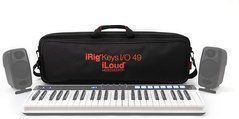
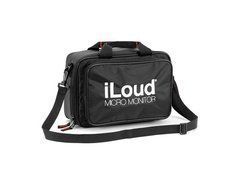
The manufacturer describes iLoud Micro Monitor Travel Bag as accommodating two monitors, while iRig Keys I/O 49 + iLoud MM Travel Bag is a separate combined accessory. Avoid reducing the request to “an IK bag”, which can obscure the intended fit. Check the full accessory and speaker names, including Micro Monitor and the relevant version.
Checking compatibility before packing
The iLoud name appears on different products, so one bag’s compatibility should not be extended to the whole family. Compare exact models, quantities and compartment arrangements. If stands or other accessories have been added, establish whether they must be removed for transport. A fitted bag does not necessarily accommodate equipment with additional parts attached.
Try the arrangement on a level surface. Cabinets should fit without pressure on drivers, controls or connectors. Do not compensate for a mismatch by forcing a closure. Where separation is provided, use it as intended so that unprotected surfaces do not rub together. With a combined bag, check the keyboard and monitors independently before closing everything. A correct fit should not require improvising where each device belongs.
Cables and power are part of the system
A mobile monitoring setup is useful only when the necessary leads and power equipment arrive with it. List the connections from source to monitors and identify the cables required by your exact model. Do not treat a general charging lead as a substitute for a dedicated connection. Check adapters against the phone or laptop you intend to take.
Use the accessory pocket without allowing plugs or a power supply to press through the fabric against a cabinet. Coil leads without sharp bends at their connectors. Avoid filling the compartment with unrelated heavy objects. Check the contents before departure and restore their regular positions afterwards. This is easier than searching for a missing adapter immediately before the next session.
Moving between studios, lessons and travel
Assess the total packed weight rather than only the empty bag. Adjust the strap for controlled carrying without the setup striking nearby objects. Use handles, straps and attachment points as intended. Do not lift a loaded bag by a pocket, flap or zipper tab. Check the grip and balance before attempting a longer walk.
On public transport, consider space and pressure from other belongings. A soft bag does not become a rigid case or establish suitability for every checked-baggage environment. If equipment regularly travels with heavy cases, assess the required protection separately. Vehicle placement should prevent sliding and crushing by other loads. The convenience of one compact bag does not remove these handling considerations.
Preparing monitors after arrival
Remove the speakers and set them up according to their instructions. A transport bag does not define their operating position or replace a stand. Leave the required panel and ventilation access. For stereo monitoring, check left and right channels, symmetrical placement and listening distance. Portability makes moving easier but does not eliminate setup requirements in a new room.
Before packing again, disconnect cables and remove adapters that could snag the material. Avoid enclosing damp equipment for prolonged storage. Clean grit and hard debris from the interior using the permitted method. Fabric and electronics require their own care instructions; the bag does not automatically give the monitors water protection. Inspect the interior before loading rather than discovering contamination during the next unpacking.
Information for an IK Multimedia order
Provide the complete setup: monitor model and quantity, controller name and required accessories. Confirm whether the intended product is a monitor-only bag or a combined version. Check straps and compartments for the exact item. Equipment shown inside a product photograph is not automatically included in the bag’s price. Verify the listed contents instead of inferring them from a promotional image.
For shared studio or classroom use, identify the bag and keep a contents list. After delivery, check closures, fit and a short carry. A useful accessory should let you assemble the familiar setup without force, pressure on components or repeated searches for cable space. Base the choice on the actual workflow rather than a matching logo alone.
For regular mobile work, decide where the empty bag will stay during the session. A clean, dry position protects the lining and prevents debris being brought back to the monitors. When handing the setup to someone else, check the contents together, including small adapters and power accessories. This keeps the complete system ready for its next use.
Micro Monitor and Pro versions
iLoud Micro Monitor and Micro Monitor Pro have separate accessories. The iLoud name alone does not confirm compatibility. Check generation, monitor capacity, compartments and space for power supplies and cables in the exact bag.
Compatibility starts with the cabinet
Match the full loudspeaker name to a compatibility list, or its external dimensions to the bag’s internal dimensions. Driver diameter does not determine cabinet height, depth or shape. Include protrusions, handles and fitted accessories.
Cover, bag or case
A slip-on cover, closed bag and rigid case serve different purposes. Check bottom protection, closures and which handles are intended for carrying. Soft padding does not establish suitability for stacking or checked-baggage transport without additional protection.
Cables and accessories
Allow space for power and signal cables and small accessories. Keep hard objects away from the grille and controls unless a separate compartment protects them. The combined equipment and accessory weight must suit the bag’s construction.
Storage and speaker operation
Switch off the equipment, unplug cables and let the cabinet cool and dry before packing. Do not treat a normal transport cover as weather protection for an operating speaker unless the manufacturer explicitly permits this use.
Buy sound equipment at SoundsGood
We can help match sources, channels, speakers, connections and budget. Provide a list of existing devices and describe where the system will operate. Confirm the warranty period and included accessories for each product.
Free delivery applies to online-paid orders from UAH 4,000. Promotional items, promo codes, special-order items and instalment payments are excluded. See the payment and delivery page for full conditions.
SoundsGood supplies sound equipment for educational institutions, studios, concert halls, conference rooms, and public and private organisations. A technical brief can be used to agree on system components, specifications, a commercial quotation, documentation and delivery arrangements.