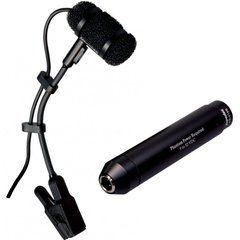
Placement and Shure version
A saxophone radiates through its bell and tone holes, so choose clip placement for balance across registers. PGA98H-XLR includes an XLR preamp connection requiring suitable phantom power. TQG uses TA4F for a compatible bodypack system rather than direct connection to an ordinary XLR input.
Sound source and pickup pattern
Choose around the voice or instrument, working distance and ambient noise. Cardioid, supercardioid, omnidirectional and figure-of-eight patterns respond differently to sound from the sides and rear. Match monitor placement to the actual model’s polar pattern.
Connections and power
Check XLR, USB or bodypack connectors and the required power. Phantom power and bias voltage for miniature microphones are different arrangements. An adapter must match electrical requirements as well as connector shape.
Position and input level
Adjust distance and angle while listening in context. Set input gain to avoid clipping on the loudest passages. For speech and vocals, account for air blasts and the use of a pop filter or windscreen.
Mounting and package
Confirm the clip, cable, adapter, windscreen and case. Clip-on models need suitable instrument mounts, while studio microphones need stands with appropriate load capacity. Do not assume every accessory is included.
Saxophone on stage, in the studio and at home
Choose around the working situation. On a stage with drums, consistent level, freedom of movement and unwanted-sound control are priorities. In a studio, distance, room contribution and attack character may deserve more attention. At home, consider background noise and your interface. One microphone can serve several situations, but the position and accessories need not remain the same. Judge the main application first, then assess the secondary uses.
Specify the saxophone type and purpose: solo performance, a section part or practice recording. If you use several instruments, plan the changeover. Compare microphones with your own playing style, including quiet phrases and strong accents. A short recording of a familiar passage makes placement comparisons easier. Keep the accompaniment settings consistent so that a change in the overall mix does not disguise the effect of moving the microphone.
Balancing the low, middle and upper registers
A saxophone radiates through its bell and tone holes, so one location does not tell the whole story. Position the microphone to test the range while the player maintains a normal posture. Listen for body as well as level across registers. If some notes sound harsh, compare angle and distance before deciding on equalisation. This changes the source capture before processing becomes necessary.
Listen during pauses and transitions too. Key action, breath and neighbouring instruments can become more noticeable with close placement. These details are not automatically faults, but they should suit the recording. A restrained ensemble part and an energetic solo may call for different balances. Save examples with the accompaniment: the useful position is one that remains clear in the arrangement, not simply impressive when heard by itself.
Clips, goosenecks and cable routing
A clip-on microphone follows the instrument as the player moves. Check that its clamp fits the bell and that the contact pads are in good condition. It should not slip, obstruct the mechanism or press on an unsuitable surface. Place the gooseneck outside normal hand movements. Ask the musician to move as they would during a concert, because a stationary test will not reveal every practical difficulty.
Leave cable slack for movement without creating a loose loop that catches on objects. Consider placing the saxophone on its stand and removing the microphone after the show. With a wired system, check the route to the mixer; with a bodypack, check its attachment point. Cable weight should not strain the miniature connector. These details become especially important during a long programme or a quick instrument change.
PGA98H-XLR and PGA98H-TQG connections
The model suffix identifies an important connection difference. PGA98H-XLR uses an XLR preamplifier connection with appropriate phantom power. PGA98H-TQG has a TA4F connector for a compatible bodypack and is not a direct substitute for an ordinary XLR microphone at any mixer. Give the exact receiving-device model before ordering. Check the entire route instead of assuming that matching brand names guarantee compatibility.
A miniature connector does not mean a wireless system is included. Confirm the transmitter, receiver and any adapters separately. Check the specific WB98H/C configuration in the same way. Connector shape alone is insufficient; power and wiring also matter. If you need both wired and wireless operation, establish both routes from the documentation before purchasing accessories. A complete plan avoids buying unnecessary components while overlooking an essential one.
Input gain and stage monitoring
During sound check, play a realistically loud phrase and leave headroom for stronger accents. Then listen to quiet passages for noise and detail. Input gain and monitor volume serve different purposes. Establish a clean input signal before adjusting its relationship with accompaniment and effects. Random fader changes cannot repair an overloaded input, and they make it harder to locate the cause when the sound changes.
Match monitor position to the microphone's polar pattern. Test with the complete band and other microphones active. If the saxophonist cannot hear clearly, identify which part of the monitor mix is masking the saxophone. Reducing unnecessary accompaniment can be more useful than raising the entire level. After moving the clip, repeat a brief check: the tonal balance and stage behaviour may both have changed. Reassess saved settings at each venue.
Package contents and care questions
Is a clip compulsory? No; a stand may be more convenient for stationary recording. Can one model cover alto and tenor? Possibly, but mounting and sound need checking on both. Is a transmitter supplied? Only when it is explicitly listed in the package. Can the microphone stay attached during transport? Follow the instructions and avoid placing stress on the capsule, gooseneck or cable inside the instrument case.
After playing, protect the microphone from moisture, avoid pulling its cable and keep small components together. Check the clamp, connector and signal before the next session. Tell SoundsGood your saxophone type, working conditions and existing interface or wireless system. Include the required accessories in the budget. A complete compatible kit supports normal performance, while a capsule selected without a suitable connection route is only part of the solution.
Buy sound equipment at SoundsGood
We can help match sources, channels, speakers, connections and budget. Provide a list of existing devices and describe where the system will operate. Confirm the warranty period and included accessories for each product.
Free delivery applies to online-paid orders from UAH 4,000. Promotional items, promo codes, special-order items and instalment payments are excluded. See the payment and delivery page for full conditions.
SoundsGood supplies sound equipment for educational institutions, studios, concert halls, conference rooms, and public and private organisations. A technical brief can be used to agree on system components, specifications, a commercial quotation, documentation and delivery arrangements.