Connectors and clothing noise
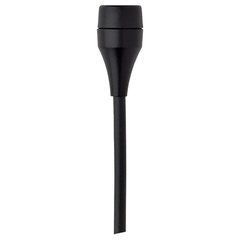
AKG C417 L and C417 PP use different connectors: mini-XLR and standard XLR respectively. Check power and signal-path compatibility. Keep fabric and jewellery from rubbing the capsule, then test recording with movement and head turns.
Sound source and pickup pattern
Choose around the voice or instrument, working distance and ambient noise. Cardioid, supercardioid, omnidirectional and figure-of-eight patterns respond differently to sound from the sides and rear. Match monitor placement to the actual model’s polar pattern.
Connections and power
Check XLR, USB or bodypack connectors and the required power. Phantom power and bias voltage for miniature microphones are different arrangements. An adapter must match electrical requirements as well as connector shape.
Position and input level
Adjust distance and angle while listening in context. Set input gain to avoid clipping on the loudest passages. For speech and vocals, account for air blasts and the use of a pop filter or windscreen.
Mounting and package
Confirm the clip, cable, adapter, windscreen and case. Clip-on models need suitable instrument mounts, while studio microphones need stands with appropriate load capacity. Do not assume every accessory is included.
A lavalier belongs to a complete recording system
A lavalier is useful when speech must be captured without a handheld microphone in the frame or a fixed stand position. Interviews, lectures, training videos and presentations are common applications, but the right arrangement depends on the recording device. A capsule with a cable, a microphone for a bodypack and a complete compact wireless system are different packages. Before comparing prices, identify existing components and exactly what the item includes. A clothing clip does not establish readiness for connection to every phone or camera.
Decide how many people will speak, how long recording lasts and whether they need to move. A wired setup may be enough for one seated interviewee, while a moving presenter needs another arrangement. For two participants, check whether separate channels can be recorded. A combined mix limits later voice balancing. The package must suit the complete scene rather than one stationary test before the conversation begins.
Connectors, power and version compatibility
The AKG C417 L and C417 PP differ in connection: the manufacturer specifies mini-XLR for L and standard XLR for PP. Sharing a basic model name does not make them interchangeable without checking. Match the microphone, powering adapter or bodypack, and recording input together. Phantom power from a full size microphone input should not be connected to a miniature capsule through an arbitrary adapter. Use the configuration intended for the exact model.
For 3.5 mm connections, check contact assignment and the input requirements. Similar plug appearance does not guarantee operation with a camera, computer or smartphone. USB operation also depends on device and application support. After assembly, make a test recording and listen to the file to confirm that the external microphone is actually being used. A connection indicator alone does not establish the correct audio route or saved channel.
Visible clips and concealed mounting
An exposed clip on a collar or lapel is often easier to inspect because fabric, jewellery or hair touching the capsule is visible. Concealment requires more attention: clothing can both muffle speech and produce rustle. Dedicated holders can provide spacing and support, but they cannot make every costume silent. Do not cover the sound opening or press the capsule against a surface without an appropriate mounting solution.
Choose placement around normal head turns and speaking habits. Ask the participant to look at the interviewer, down at notes and towards the camera. If level changes sharply, refine placement before starting. The aim is intelligibility in a natural posture rather than forcing someone to speak towards one fixed point. A neatly visible microphone may be more practical than a concealed installation that continually distracts with noise.
Cable and clothing noise
Rustle can come from fabric touching the capsule, cable movement or the clothing itself. Changing the windscreen therefore does not always solve it. Support the cable with a little slack near the microphone so tension is not transmitted directly to the clip. Check its route beneath clothing and the bodypack position. Avoid trapping the cable where body movement repeatedly pulls the capsule or connector and produces mechanical noise.
Test seated, standing and during ordinary gestures. Ask the participant to adjust a jacket or turn as they would on camera. Listen to the recorded signal through headphones, since a small mechanical sound may be much more prominent in the channel than in the room. Address the cause first instead of relying on software cleanup that may damage consonants or natural vocal quality. Repeat the movement test after changing the mounting.
Outdoor use, wireless operation and recording checks
Outdoors, choose suitable wind protection and test it in the actual wind direction. A small foam cover is not a universal answer for every condition. Capsule placement and clothing movement remain important with additional protection fitted. For wireless systems, test the presenter's route, receiver position and operation when the body obstructs the path between devices. An advertised range does not replace a check of the real location.
Check battery state, available operating time and actual file saving. Internal recording, safety tracks and similar functions exist only in particular models and modes; do not assume them from the phrase wireless lavalier. Set level using the loudest expected phrase and retain headroom. Monitor important interviews throughout rather than only during the opening greeting. Listening to a few seconds of the saved file can expose a routing mistake before the full conversation is recorded.
Questions before buying a lavalier
Can one lavalier record two people? It can capture a combined sound, but placing it near one participant will not provide equal balance for both voices. Are all lavaliers wireless? No. Many require a wired connection or a separate radio system. Can every microphone be hidden under clothing? Not every body shape and fabric combination produces an acceptable result. Test the actual costume and normal participant movement.
Why is the phone using its own microphone? Check adapter compatibility, input selection and application support for external audio. What belongs in the budget? The necessary adapter or wireless package, mounting accessories, wind protection, cables and recording monitoring. What information helps with selection? Provide the exact camera, phone or transmitter model, participant count, location and whether the microphone must be concealed. These details help identify a system ready for the real task without missing components.
SoundsGood supplies sound equipment for educational institutions, studios, concert halls, conference rooms, and public and private organisations. A technical brief can be used to agree on system components, specifications, a commercial quotation, documentation and delivery arrangements.