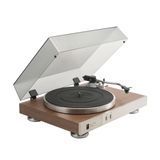
Choose a turntable as part of the system you intend to use, rather than as an attractive object in isolation. One buyer wants to enjoy albums through powered speakers, another wants to build a home hi-fi system gradually, and a third wants to practise scratching or mix two records. The machines may look similar while requiring very different features. This guide explains drive systems, PHONO and LINE connections, cartridge choices, basic tonearm setup and common causes of noise. Our catalogue examples are the Numark PT01 Scratch, JBL Spinner BT and JBL TT350 Classic. They serve different purposes, so price and weight alone are poor ways to compare them. Technical details have been checked against manufacturer documentation. The practical scenarios are system-planning advice, rather than claims of our own laboratory testing. Start by deciding what you will actually do after placing a record on the platter, then consider the controls and connections that make that activity possible.

1. Define the way you will use the system
Write down your desired result in one sentence: listen to an album in the living room, learn rhythmic scratching, or prepare a vinyl DJ set. Then list the equipment you already own, including exact model names. The word speakers tells you very little about connectivity. It might mean passive loudspeakers, a powered stereo pair, a Bluetooth speaker or studio monitors with individual inputs. An amplifier may have a suitable phono stage, or it may offer only line inputs. This simple inventory immediately reveals missing parts. For DJ use, add a mixer, headphones, space for a second deck and a way to record practice sessions. For home listening, everyday operation, replacement stylus availability and convenient cleaning may matter more. Every feature you pay for should support a specific action in your intended setup. Separate activities you will perform regularly from vague ideas about a possible future upgrade, so that an imagined expansion does not prevent you from building a complete working system now.
2. Understand the complete signal path
The mechanical assembly rotates the record and supports the stylus as it follows the groove. The cartridge converts that movement into an electrical signal, which must then be processed and amplified appropriately. The signal eventually reaches a power amplifier and loudspeakers, or powered speakers with amplification inside. Manufacturers can combine several stages in one enclosure, but their functions still need to exist. This is why two identical-looking RCA sockets can carry signals at different levels. A useful check is to trace the path from stylus to speaker and label every stage. A conventional PHONO output connected directly to a line input is missing the appropriate phono stage. A signal passed through two phono stages is also incorrect. Do not start correcting either problem with an equaliser. Identify the purpose of each input and the position of relevant switches first. A clear diagram on paper is often more useful than buying a collection of adapters based only on plug shape.
3. Belt drive and direct drive without the myths
A belt-drive mechanism transfers rotation through a belt, whereas a direct-drive mechanism drives the platter directly. JBL Spinner BT illustrates the first approach and TT350 Classic the second. However, the drive label does not describe the entire sound, noise performance or suitability for DJ work. The particular motor, speed control, mechanical assembly, tonearm, cartridge and installation all contribute to the result. For a home purchase, compare the complete feature set and servicing requirements of the actual model instead of arguing about the principle in isolation. For DJ learning, investigate how the deck responds to manual record control, whether tempo adjustment is available and what use the manufacturer specifies. A belt is also a replaceable component, so checking future availability is sensible. Never transfer specifications from one machine to another simply because their names are similar. Related models can have different mechanisms, connections and operating limits, and an instruction for one is not automatically valid for the other.

4. Why direct drive does not automatically mean DJ capability
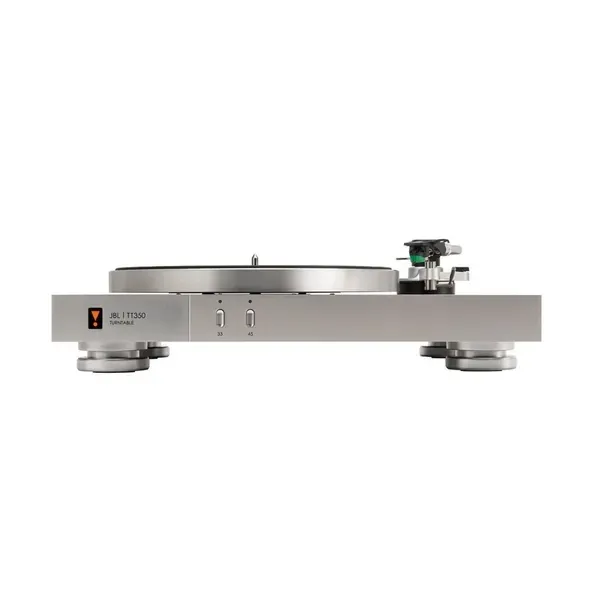
Manual mixing requires control over tempo and the relative position of two records. Dedicated DJ decks such as the Pioneer DJ PLX-1000 provide controls for that purpose. This is a functional reference, rather than a claim about current shop availability. On the JBL TT350 Classic, direct drive supports home playback; the model does not provide the familiar DJ pitch fader. Buying it to learn conventional beatmatching solely because its specification says direct drive would therefore miss an essential requirement. List the exercises you want to perform: starting from a chosen point, bringing in the next track, keeping two rhythms together and working a crossfader. Then identify the controls needed for each exercise. A more expensive enclosure cannot replace a missing function. This approach helps prevent a purchase that must be sold after the first few practice sessions. For a home listener, the absence of DJ controls is not inherently a disadvantage, because the desired activity and daily operating requirements are different.

| Use | What to check |
|---|---|
| Home listening | Complete speaker signal path, maintenance, convenience |
| Portable scratching | Controls, monitoring, recording route |
| Two-record mixing | Tempo control, second deck, mixer, headphones |
5. Numark PT01 Scratch and the portable practice scenario
The PT01 Scratch centres on a compact format with a scratch switch and built-in speaker. Consider it for learning rhythmic record movements and portable practice, rather than as a complete equivalent of two full-size club decks and a mixer. Start with a short exercise: move the record forwards and backwards consistently, then introduce rhythmic cuts. Focus on repeatable movement before attempting maximum speed. A stable surface and comfortable hand position matter more than complicated accompaniment. Before buying extra accessories, establish whether the switch position suits you and whether the record format works for your exercises. This machine can form a useful independent part of learning, while the decision to buy a second full-size deck remains separate. Portability and the ability to build a complete two-deck DJ set are different qualities, even though both devices play vinyl. A realistic weekly practice target is more useful than trying to reproduce a performance created on a substantially different equipment setup without understanding the differences.

6. JBL Spinner BT and a flexible home connection
Spinner BT is designed for home listening and offers a choice between analogue connection and Bluetooth transmission. Its built-in phono stage can be bypassed when an appropriate external path is required. For the buyer, this primarily means flexibility: the turntable may work with existing powered speakers now and move into a different system later. Nevertheless, decide which route will be your main one. If you will normally listen by cable, consider RCA access and the convenience of the relevant switch. If wireless headphones are the main requirement, check the particular receiver, pairing and volume control. Bluetooth does not automatically guarantee every codec or an absence of delay. Nor does a domestic design imply that the record should continually be moved backwards and forwards for scratching. Choose it for convenient enjoyment of your collection, rather than visual similarity to performance equipment. A practical home system should be easy to start without rearranging the room while preserving the correct connection between all of its components.
7. What a JBL TT350 Classic system needs
TT350 Classic needs an appropriate phono stage in the playback chain. That can be an MM PHONO input on an amplifier or a separate unit feeding a line input. The presence of RCA sockets does not mean the turntable can correctly feed any powered speaker without additional signal processing. Assess this architecture in relation to the amplifier you already have and your plans for the system. If a suitable input is available, the connection may be straightforward. If not, include a phono stage and the necessary cables in the budget before ordering. A removable headshell and adjustable tonearm also provide options for later setup changes, but they do not create an obligation to replace the supplied cartridge immediately. Install the original arrangement correctly, listen to familiar records and identify the actual problem an upgrade would solve. A properly adjusted stock system gives you a clear starting point, whereas changing several components immediately makes it harder to understand what each change contributes.

8. PHONO and LINE: two common wiring mistakes
A conventional magnetic cartridge requires specialised amplification and equalisation from a phono stage. Feeding that signal straight into a line input produces a very quiet and tonally incorrect result. The opposite mistake happens when an already processed LINE signal enters a PHONO input: the system may overload and have an unnatural tonal balance. Before changing switches, reduce volume, stop playback and read the labels on both devices. Taking a photograph of the correct arrangement can help if the equipment is moved regularly. Do not assume a connection is correct simply because the plug fits. Connector shape does not establish signal level. With an external phono stage, label its input and output so that they are not confused after cleaning or relocation. If the amplifier offers MM and MC options, follow the installed cartridge type and the instructions rather than choosing whichever sounds louder. Establish correct routing before judging sound quality or trying to change the tonal balance with other controls.

| Output | Correct next stage |
|---|---|
| PHONO | Compatible phono stage or PHONO input |
| LINE / active built-in phono stage | LINE / AUX input |
| External phono-stage output | LINE input, not another PHONO stage |
9. Powered speakers, passive speakers and headphones
Powered speakers contain amplification, but they still need an appropriate input signal. Passive loudspeakers require a separate power amplifier: an ordinary turntable RCA output cannot drive them directly. Headphones likewise need an output or amplifier intended for their load. Before buying anything, draw a connection diagram with specific input and output labels instead of saying that you will connect the turntable to a music system. On a desk, check that there is room for the deck, both speakers and safe tonearm movement at the same time. In a living room, consider how volume will be controlled from the listening position. Speakers with independent gain controls may call for another solution to convenient master volume adjustment. An arbitrary adapter cannot replace a missing functional stage. Determine the job of the required device first, its connectors second, and cable type and length afterwards. This sequence is particularly useful when combining older household audio equipment with a new turntable, because familiar labels can appear in several different implementations.
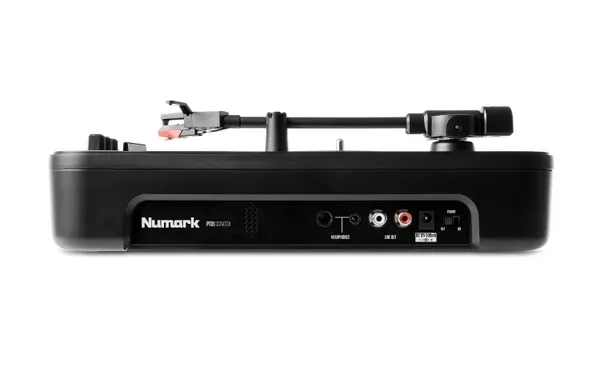
10. When Bluetooth helps and when it gets in the way
Wireless connection is convenient when the priority is relaxed album listening without a long cable across the room. Rhythmic hand control is a different situation: a delay between moving the record and hearing the result can interfere with timing. Plan a wired monitoring route for DJ practice and assess the response of the complete system. At home, test the connection with your own speaker or headphones rather than an unrelated demonstration receiver. A transmitter supporting a particular codec does not guarantee that codec will be used with every receiving device. The wireless path also includes digital conversion; that is an ordinary engineering characteristic, but it is not an entirely analogue chain. Choose according to your priorities. Convenience has real value if it encourages you to listen to more music. Where predictable immediate response to movement is essential, a wired connection provides a clearer foundation for practice and troubleshooting. These two uses cannot sensibly be settled by one universal claim that a transmission method is always better.
11. Record speed and format
Do not infer playback speed solely from record diameter. Read the marking on the particular release: a large record can require 45 rpm, and a small one may not match your first assumption. Incorrect speed changes both duration and pitch. For an initial check, use a familiar recording with a clear voice, then compare the selected setting with the label. A 78 rpm mode, such as the one provided on PT01 Scratch, does not automatically make the fitted stylus suitable for every old record. Shellac releases require a separate compatibility check between stylus and recording. Do not experiment with a rare family record merely because the motor offers the required speed. Similarly, an adapter for a large centre hole solves a mounting problem, not a groove-format problem. Correct playback begins by identifying the medium and then checking the capabilities of the actual turntable. If an old record's origin is unknown, establish its format and playback requirements before trying it in your new system.
12. Positioning is part of setup
Choose a stable surface that does not wobble under ordinary contact and leaves enough clearance for the lid. A cable should not pull on the enclosure or obstruct your hand near the tonearm. When speakers share the same lightweight table, mechanical vibration can travel through that surface, so separating the devices and checking at normal listening volume is worthwhile. Begin with practical positioning changes rather than buying expensive accessories at random. Walk past the system and gently touch the working surface to identify obvious stability problems. Do not deliberately strike the furniture to test the stylus. Leave space for the sleeve and cleaning brush so that they do not end up on the open deck. Good organisation reduces accidental movement above the record. In a family living room, also consider children and pets: the tonearm should be protected from unintended contact during play or cleaning. A suitable location solves a mechanical problem while making daily use calmer, especially in a small room serving several purposes.
13. Assembly after unpacking
Before first use, lay out the components on a clean surface and check them against the instructions for your exact model. Transport restraints, platter installation, belt fitting, counterweight assembly and lid attachment vary between machines. Do not copy a video about a similar turntable if the parts and layout differ. Keep the stylus guard in place during operations where the instructions permit it, and never carry the deck by its tonearm. Retain the packaging and internal supports for possible transport. After assembly, check that nothing touches the rotating platter and that cables are not trapped beneath the enclosure. Carry out the first start slowly and at low volume. If a part requires substantial force to fit, stop and check its orientation. Forcing an assembly can create a fault that did not previously exist. Correct preparation matters more than hearing the first song immediately. Where the manual specifies a sequence, complete it in order rather than skipping a preparatory step because the next operation looks obvious from a photograph.
14. Tonearm balancing depends on the design
Not every tonearm should or can be balanced using the same procedure. The PT01 Scratch uses a prebalanced arrangement; instructions involving another deck's large rear counterweight should not be transferred to it. The TT350 Classic manual describes the appropriate balancing and tracking-force procedure for its own arm. In practice, identify the exact turntable and installed cartridge before touching adjustments. Work over a clear surface, without a record beneath an unprotected stylus, and support the arm as directed by the manufacturer. If you are uncertain, arrange initial setup with a competent technician and record the correct settings. Do not compensate for unknown balance by adding a coin to the headshell. That conceals the underlying issue and makes the actual load unpredictable. Understanding the sequence matters more than reproducing a hand movement from a short video that does not explain the design. After setup, distinguish controls used during normal playback from adjustments that should remain in place until servicing or a cartridge change.
15. Tracking force and anti-skating
For the supplied Audio-Technica AT-VM95E in TT350 Classic, JBL's manual specifies 2 g tracking force and an initial anti-skating setting of 2. These values are not universal recommendations for every cartridge or turntable. After changing the cartridge, consult its specification and the tonearm setup procedure again. Less tracking force does not automatically mean gentler playback, because unreliable groove tracking is also undesirable. Do not exceed the permitted range to conceal dirt, damage or an unstable surface. Anti-skating recommendations for ordinary listening and specialised DJ techniques can differ; a scratching recommendation should not be copied blindly onto a domestic setup. If using a stylus force gauge, follow its instructions and consider measurement height. Rechecking after transport or a cartridge change is more useful than randomly turning adjustments for every new record. Keep a note of the correct starting settings. They provide a clear reference if later experiments fail to help or make the source of a problem harder to identify.
16. Cartridge and replacement stylus
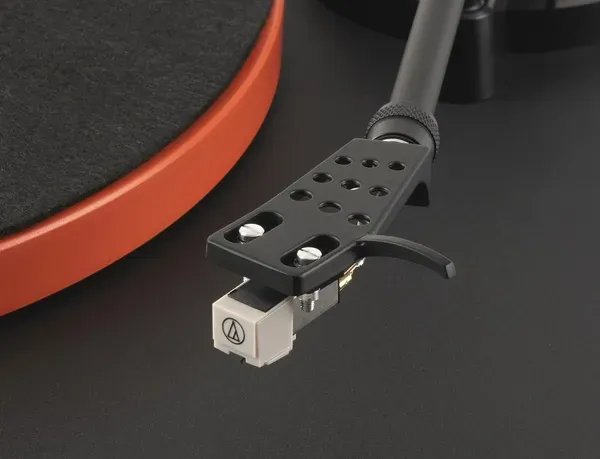
The cartridge and stylus are related components, but they are not interchangeable terms. Many designs allow a separate stylus assembly to be replaced, and compatibility must be established by specification rather than plastic colour or a similar shape. Before ordering, write down the exact designation of the fitted cartridge and compare it with the documentation. On a used turntable, the original specification in a review may no longer describe the installed equipment. Replacing the complete cartridge can require alignment, mass compatibility checks and a fresh tracking-force adjustment. The most expensive cartridge is therefore not always the easiest or most sensible first upgrade. Start with stylus condition, clean records and correct connections. Never touch the tip with a finger to test sharpness. If damage is suspected, stop playing valuable records until the assembly has been examined. A replacement decision should follow condition and compatibility, rather than a desire to change one component without understanding the mechanism. Consumable availability belongs in ownership planning even when immediate replacement is unnecessary.
17. Cables, contacts and background hum
If hum appears, first reduce volume and check the connections. Where the devices provide a ground lead and suitable terminals, connect them according to their instructions. A turntable signal-ground terminal is not a reason to experiment with protective mains earthing. Never remove protective earth connections from electrical equipment. For external troubleshooting, move signal cables away from power supplies and check whether spare cable is tightly coiled beside a transformer. Change one condition at a time so that the effect remains identifiable. If only one channel hums, inspect accessible plugs and their seating without applying force to delicate cartridge connections. Do not buy another phono stage before excluding a simple wiring error. Record when the noise occurs: continuously, only with the stylus lowered, or increasingly as volume rises. These observations make a consultation more useful. If further investigation requires opening an electrical device, stop at external checks and pass the specific findings to a qualified technician instead of modifying an unfamiliar circuit.
18. USB recording and recording scratches are not necessarily identical
The PT01 Scratch USB connection supports computer recording, but that does not mean it carries every signal and action heard through the analogue output. Its manual separately describes auxiliary-input limitations and specifies the scratch switch's action for the speaker, headphones and line output. Before recording an entire practice session, make a short test: play the record, add accompaniment, perform several cuts and listen to the saved file. If you need the complete analogue result, plan to capture the appropriate line output through a compatible audio interface. USB should not be treated as this turntable's power source either. For album digitisation, monitor level, leave headroom and confirm that both channels are present. Do not start with the whole collection on an untested routing arrangement. A minute of trial material can prevent hours of repeat work after discovering a missing channel or unexpected signal. Check the saved recording itself, rather than relying only on live monitoring, because the two paths may not contain identical material.

19. Cleaning records and the stylus
Dust on a record and contamination on the stylus can affect playback, but cleaning must suit the materials involved. Use products intended for records and avoid experiments with household solvents. Follow the cartridge manufacturer's stylus-care guidance. Ortofon recommends careful dry cleaning with a suitable brush from the rear towards the tip, without brushing backwards or sideways. That is not permission to press hard on the delicate assembly. Work in good light and secure the arm. Handle records by their edges and label area, returning them to clean inner sleeves after listening. If ordinary care does not remove contamination, clarify the appropriate method instead of applying progressively greater force. Cleaning cannot restore a mechanically damaged groove or worn tip, so expectations should match the condition of the medium. Do not assign a universal replacement date solely by the calendar. Usage and actual condition matter. When performance changes noticeably, establish the cause before choosing maintenance, rather than treating every noise as proof that the same component needs replacement.
20. Finding the cause of distortion
Compare several clean records to determine whether the problem occurs across the collection. If distortion appears at one point on one release, the medium itself may be responsible. If it repeatedly affects one channel, check connections and stylus condition before replacing the system. For a general problem, begin with PHONO/LINE routing, cartridge setup and possible overload further along the signal path. Lowering speaker volume does not necessarily remove distortion already created at an earlier input. Brief notes help: record, side, passage, channel and playback conditions. This converts the impression that everything sounds wrong into a specific investigation. Do not use equalisation to hide a mechanical fault. If performance suddenly deteriorates after accidental stylus contact, stop playback and inspect the assembly. Sequential diagnosis is cheaper and more informative than simultaneously buying a cable, cartridge and amplifier without identifying a cause. When asking for help, include the checks already completed so that the investigation can narrow the possibilities rather than start again from an unclear description.
21. Budget for a complete working system
The turntable price may be joined by a phono stage, amplifier, speakers, cables, cleaning supplies and future replacement styli. For DJ use, a mixer, headphones, second deck and transport protection become separate costs. Prepare two budgets: the smallest complete arrangement that works now, and a possible later expansion. This reveals whether one expensive component consumes the funds while leaving the system unfinished. Judge an accessory by a specific benefit: does it solve an existing problem, or merely add another object? Keep some budget for records and maintenance, because using the collection is the purpose of the purchase. Check current prices and availability on product pages before ordering. Do not compare two models by total cost until you have accounted for their built-in functions and your existing equipment. A cheaper enclosure may need more external devices, while a dearer one may include functions you do not require. A useful budget describes how the system will operate and be maintained, not just the value of the first order.
22. Planning a useful audition
Bring familiar clean records containing different material, such as voices, acoustic instruments and rhythmic music. Compare at comfortable, reasonably matched levels and avoid deciding from a few especially loud seconds. Beyond tonal impressions, try the daily operations: opening the lid, placing a record, cueing the arm, finding the switch and stopping playback. A beautiful demonstration stand does not solve awkward access on your own shelf. For a DJ purchase, test the required exercise rather than only listening in the background. Ask for setup explanations without changing several parameters at once. Do not interpret the difference between two unfamiliar cartridges as proof that one drive principle is superior. The result belongs to the complete system and demonstration conditions. Write observations in ordinary language: what felt convenient, what raised doubts and what was missing. That record supports a considered decision after the demonstration instead of dependence on an impressive sales phrase. If the comparison uses different rooms, acknowledge that difference before attributing every change to the turntable itself.
23. Transport and storage
Follow the manufacturer's transport instructions so that heavy removable parts and the moving tonearm are prepared correctly. Closing the lid alone does not provide full transport protection. Do not leave the counterweight or platter able to move freely and load the mechanism during a journey. If you will carry the system often, investigate an appropriate case and the packing routine before purchasing. At home, store records vertically in suitable sleeves, away from heat and direct sunlight. Do not place heavy objects on the turntable lid or use it as a shelf. After extended storage, check cleanliness and the condition of consumable components before playing a record. For portable equipment, consider the manufacturer's battery-storage advice where batteries are fitted. Proper packing saves more time than searching for a quick repair after an unrestrained component has been bent in transit. Before a move, reserve a clear place for packing so that this delicate task is not rushed among heavy boxes at the last moment.
24. Your final pre-purchase checklist
State the main use and match it to the model's actual functions. Trace the signal from cartridge to speakers, confirm the necessary phono stage and establish how volume will be adjusted. Check installation space, connector access, lid clearance and safe tonearm operation. Identify the exact cartridge, replacement stylus and supplied accessories. If you need beatmatching, verify the DJ controls rather than making an assumption from direct drive. If you need recording, establish which signals reach the saved file. For Bluetooth, check the actual receiver. Numark PT01 Scratch, JBL Spinner BT and JBL TT350 Classic can suit different systems, but they perform different roles. The best choice fully supports your present activity and has a clear maintenance path. Once that foundation is correct, the purpose is straightforward: enjoy records, listen to music and develop the skills you want without continually correcting basic connection mistakes. Keep your wiring diagram and initial settings so that the same dependable arrangement can be restored after cleaning, relocation or a later component upgrade.